
Camera Remote Watch
AppMosaicPhotography
1.6127.00 Reviews
- Version
- 1.2.9
- Installs
- 10.00K
- Age Rating
- Everyone
Screenshots


Our Review of Camera Remote Watch
 Analysis by Appyee
I find a watch-operated camera remote most useful when the person taking the picture needs to be in it too. At a family dinner, for example, I can prop up the phone, join everyone at the table and trigger the shutter without asking somebody to leave their seat. That small change makes group photos feel less staged, and it avoids the familiar scramble to beat a phone timer.
That is the practical idea behind Camera Remote Watch, a photography app from AppMosaic. It turns a compatible smartwatch into a way to trigger a phone camera from a short distance. The appeal is deliberately narrow: this is not a replacement for a camera app or a full editing tool, but a remote shutter for situations where reaching the phone would spoil the shot.
What the shared-device setup asks of you
The useful question before paying is not just whether you own a watch, but whether the watch and phone you plan to use can work together with the app. The description says the watch controls the phone’s camera, but compatibility is the first practical boundary to check. I would verify that the particular devices and operating systems are supported before building a photo plan around it; owning a smartwatch alone does not guarantee a useful pairing.
There is also a difference between sharing a phone and sharing control of its camera. In a household, one person may set up the phone while another holds the watch, but that arrangement depends on the devices being paired and available to one another. I would settle that before guests arrive, rather than trying to troubleshoot while everyone is waiting in position. A quick test at home can reveal whether the connection is ready and whether the phone’s camera view is framed as intended.
For a shared family device, keep the workflow simple: choose the phone that will take the photo, place it securely, compose the shot on the phone, then hand over the watch for the shutter press. This avoids passing the phone around after the framing is done. It also reduces the chance that someone changes the camera position while trying to help. The app’s role is clearest when one person handles framing and another triggers the picture, even if both are standing in the same room.
Coordination matters more than extra camera controls
A remote shutter is most valuable when the phone is already in a sensible place. On a shelf or stable surface, the watch can solve the timing problem; it cannot fix a phone that is tilted, blocked or precariously balanced. I would check the edges of the frame on the phone before moving into position, especially for a group shot where a lamp, doorway or chair can hide behind someone’s head. Those few seconds of checking matter more than a clever pose.
For a household portrait, I’d agree on a simple signal before everyone spreads out: get in place, pause, then trigger the shutter. That helps with children, pets or anyone who tends to look away at the last moment. A remote can remove the need to run back to the phone, but it does not automatically coordinate the people in front of it. Clear timing is still part of taking the picture.
The same approach suits a hands-free cooking photo, a hobby demonstration or a quick picture of a family project. I can keep my hands near the activity, step back far enough to fit the scene, and take the shot without touching the phone. For anything involving movement, though, the remote only helps with the moment of release; it does not make the phone track a subject or guarantee that the action will land in frame.
What’s the Buzz All About?
Okay, so let’s dive into the nitty-gritty. The Camera Remote Watch app is essentially designed to transform your smartwatch into a remote control for your phone’s camera. Imagine being able to click photos from a distance without having to rush back to your phone. Sounds cool, right? Well, it is.
First off, setting it up is a breeze. All you need is a compatible smartwatch and smartphone, and you’re good to go. The app syncs seamlessly, allowing you to control your camera with just a tap on your wrist. This means you can now say goodbye to those awkward selfies where half your face is cut off. Yay for symmetry!
Features That Make It Stand Out
Now, I know what you’re thinking—“Another camera app? What makes this one special?” Well, let me break it down for you.
- Ease of Use: The interface is super intuitive. Even if you’re not tech-savvy, you’ll find it easy to navigate. Plus, the app offers a quick setup guide that’s really helpful.
- Compatibility: It works with most Android and iOS devices. Check the app store for a list of compatible devices, but in general, it’s pretty inclusive.
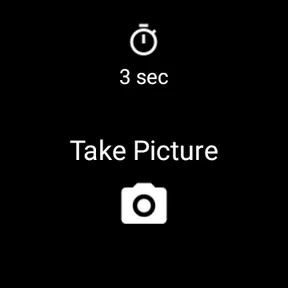
- Customizable Timer: You can set timers for up to 30 seconds. Perfect for getting into that perfect pose or adjusting your props.
- Live Preview: This feature allows you to see exactly what your camera sees, right on your watch. No more guessing games!
With these features, taking group photos, action shots, or even just everyday selfies becomes a whole lot easier. Plus, the live preview feature is a lifesaver when you’re trying to get the perfect shot.
Getting better results without turning this into a production
I would treat the watch preview as a framing aid, not as a reason to skip checking the phone itself. A small watch screen can help confirm that the scene is roughly composed, but it is still worth looking at the phone before stepping away to make sure the lens is clear and the device is stable. For a wide group, placing the phone a little farther back may help more than trying to squeeze everyone into the frame from too close.
The timer is useful when pressing the shutter immediately would catch people mid-adjustment. I’d use it to give everyone a moment to settle after I trigger the shot, rather than treating it as a way to rescue a badly timed setup. For a still group portrait, a short pause can make faces look more natural; for a child or pet that may move, a delay can instead increase the chance that the moment passes. The best choice depends on whether the scene is waiting for you or changing quickly.
There is a trade-off between a dedicated remote and the phone’s usual timer. A timer is already enough when I can reach the phone and do not mind walking back into position. The watch becomes more worthwhile when I want to take several attempts, remain beside the group, or capture a series of moments without repeatedly returning to the device. A separate camera remote may suit people who want a physical button, while this app makes more sense when a compatible smartwatch is already part of the setup.
Who should use it, and who should look elsewhere
I can see this being a good fit for someone who often takes portraits, family pictures or travel photos with a phone and already uses a compatible watch. It is especially handy for people who take pictures alone: set the phone down, move into the frame, check the composition, then release the shutter from the wrist. It also helps when a phone is positioned somewhere awkward to reach, as long as it is placed safely and the connection is working.
I would skip it if I rarely take self-timed pictures, do not own a compatible smartwatch, or expect a remote to replace the phone’s camera controls. If the main goal is editing, filters, manual exposure or advanced photography, a full camera app is the more relevant choice. If I only need one occasional group portrait, the built-in timer may be perfectly adequate and costs nothing extra to use.
It is also not the right solution for every kind of action shot. A watch trigger still leaves me responsible for choosing when to take the photo and aiming the phone beforehand. For a fast-moving subject, a person behind the phone or a camera mode built around tracking may be a better fit. I see this app as a convenience for deliberate, mostly stationary scenes, not as a substitute for a photographer or an automatic capture system.
The household angle deserves a little care. A shared watch and phone can make it easy for another person to trigger a photo, but that does not mean the app provides separate family profiles or controls for who may use the camera. I would treat access as a matter of who has the paired devices and agree on their use, particularly when the phone belongs to someone else. The Everyone age rating is a broad content classification, not a promise that every child can independently set up or use the device pairing.
Price, expectations and the household verdict
Camera Remote Watch costs $2.49, so I would judge it by how often I actually take pictures from a distance. Its average rating is 1.6 from 466 ratings, with 127 written reviews, which is a reason to be cautious rather than assume the experience will be smooth for every device combination. It has 10K+ installs, is listed for everyone, and its current version is 1.2.9; it was released on February 20, 2018. AppMosaic is the developer.
Before relying on it for a birthday or a trip, I would test the exact phone-and-watch combination, confirm the camera view and take a few practice shots. That is a better answer to the common question of whether setup will be effortless on a particular household’s devices than assuming every pairing behaves the same way. I would also check whether the person operating the watch can see enough of the framing to make a confident decision, or whether the phone should remain within sight.
As someone who loves to travel and capture moments, I found this app incredibly useful. Picture this: You’re standing in front of a beautiful landscape, and you want to take a photo without the hassle of setting your phone on a timer and running back and forth. With the Camera Remote Watch app, you simply set your phone up, walk to your spot, and click away using your watch. Simple and efficient.
And it’s not just for travel. Whether you’re at a family gathering, a party, or just hanging out with friends, this app adds a fun twist to taking photos. Plus, it’s a great conversation starter!
Wrapping It Up
So, should you get the Camera Remote Watch app? If you love photography and are looking for a way to make your photo sessions more enjoyable and less awkward, then absolutely. It’s user-friendly, reliable, and adds a whole new dimension to taking pictures.
Sure, it’s not perfect—sometimes there’s a slight delay in response time, especially if your watch is running low on battery. But overall, it’s a fantastic tool that’s worth checking out.
Ready to give it a go? You can download it from the app store on your device. Happy clicking!
Verdict
Strengths of Camera Remote Watch
- Easy to set up and start using.
- Compatible with most smartwatch models.
- Provides real-time photo previews.
- Allows remote video recording.
- Minimal battery consumption.
Limitations of Camera Remote Watch
- Limited features on older watches.
- Occasional connectivity issues.
- No support for external lenses.
- Requires phone app to function.
- Interface could be more intuitive.
Other Releases by AppMosaic
View All
Tide Table Chart
Travel & Local3.0
Similar Picks in This Category
View All
Google Photos
Google LLC4.4

Gallery
Google LLC4.2

Picsart AI Photo Editor, Video
PicsArt, Inc.3.9

B612 AI Photo&Video Editor
SNOW Corporation4.1

BeautyPlus-Selfie Photo Editor
PIXOCIAL TECHNOLOGY (SINGAPORE) PTE. LTD.4.5

Remini - AI Photo Enhancer
Bending Spoons4.1
Frequently Asked Questions
What is Camera Remote Watch, and how does it work?
Camera Remote Watch is an app designed to allow users to control their smartphone camera remotely via a smartwatch. By installing the app on both devices, you can take photos, start video recordings, and manage other camera functions directly from your wrist, offering convenience and flexibility, especially for group photos or creative photography.
Is Camera Remote Watch compatible with all smartwatches and smartphones?
Compatibility can vary. Camera Remote Watch is typically compatible with most Android and iOS devices, but the functionality may differ depending on the specific model and operating system version of your smartwatch and smartphone. It's advisable to check the app's compatibility details on the app store before downloading.
Does Camera Remote Watch require an internet connection to function?
No, Camera Remote Watch does not require an internet connection to work. It uses Bluetooth to establish a connection between your smartphone and smartwatch. Ensure both devices have Bluetooth enabled and are within a reasonable range to maintain a stable connection for optimal performance.
What are the primary features of Camera Remote Watch?
The app offers a variety of features including remote shutter control, video recording, and zoom functions. It may also offer additional settings such as timer options and the ability to switch between front and rear cameras. These features enhance the convenience of taking photos or videos without physically holding your phone.
Are there any privacy concerns with using Camera Remote Watch?
As with any app that accesses your camera, it's important to consider privacy. Camera Remote Watch requires permission to access your camera and Bluetooth. Ensure you download the app from a reputable source and review the privacy policy to understand how your data is handled to protect your personal information.
